Anvil Logo
Products
Industries
Resources
Developers
Etch e-sign

Skip a signer

In this article, we’ll show you how to use the skip signer feature to progress a packet past unnecessary signers.

Back to Help Center

The skip signer feature allows you to progress a packet past a signer if they no longer need to sign. Skipping a signer will allow the next signer to sign.

If the skipped signer is the last signer in a signature packet, the packet and/or Workflow submission will be finalized and marked as completed.

To skip a signer:

  1. Navigate to the relevant Etch packet or Workflow submission
  2. Locate the signer you wish to skip
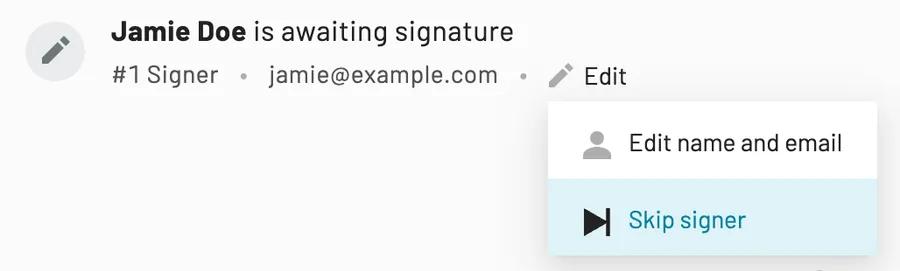
  3. Click the edit button
  4. Select Skip signer The skip signer button is the second option in the dropdown menu
  5. Click OK to confirm
Back to Help Center

Other common posts

1 - 0 of 0

Contact support

We know dealing with tech support can be painful. It's our goal to help you as quickly and efficiently as possible. Once we get your message, we will email you back as soon as we can.
    Want to try Anvil first?